
Add
Point Easy File Renamer at a folder — Pictures, Downloads, or a camera card. Include subfolders if the mess is nested.
Products / Easy File Renamer
 Easy File Renamer
See the new name. Then apply.
A batch file renamer for Windows and Mac — prefixes, replace, numbers, and a preview column before anything is written.
Downloads named Document (2). Camera dumps named IMG_4721. Easy File Renamer stacks the rules so you can read the New Name column, then rename.
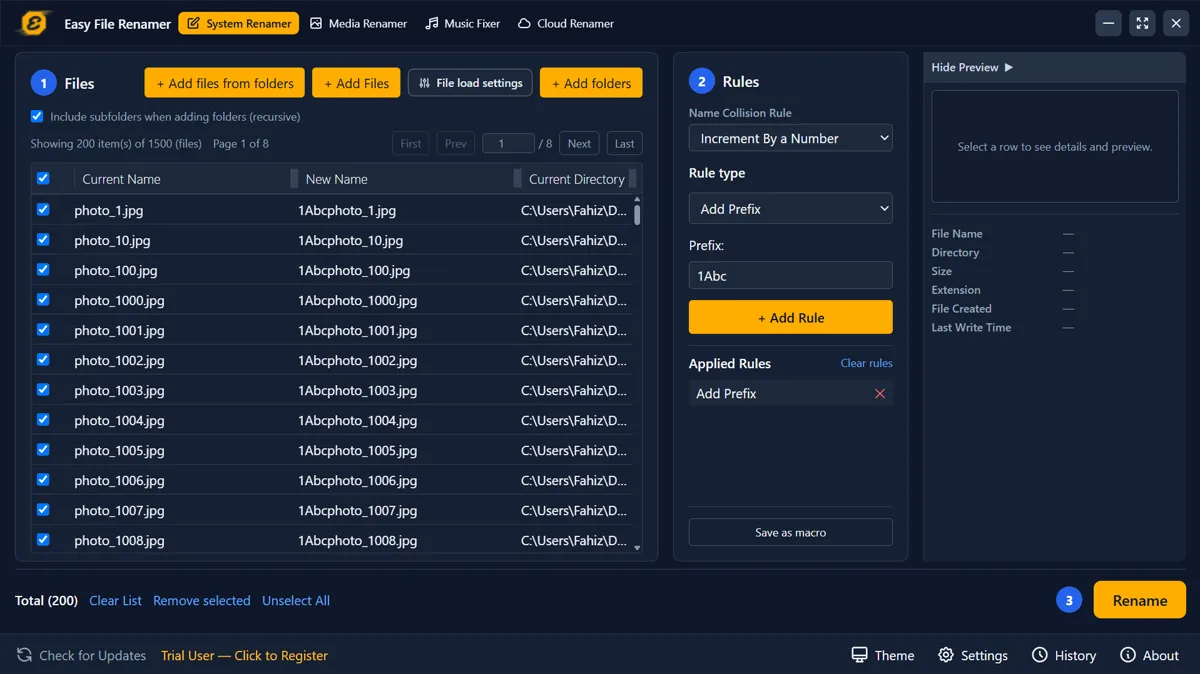
File Explorer will add (1) and (2). Easy File Renamer lets you stack named rules, watch the New Name column update, and apply when the pattern looks right. Work stays on the PC or Mac.
Point Easy File Renamer at a folder — Pictures, Downloads, or a camera card. Include subfolders if the mess is nested.
Add a prefix, replace text, trim, insert, or number the set. The New Name column updates as you stack rules. Save the stack as a macro if you will run it again.
Hit Rename when the preview is the pattern you want. History logs the batch. It is a log, not Explorer-style undo — keep a copy if the set is precious.
Want Explorer and PowerRename first? How to batch rename files in Windows.
Every rule writes into the preview before disk. Nothing is renamed until you click Rename.
Prefix, suffix, replace, trim, insert, case, extension, and ascending numbers — order matters, and you can save the stack.
Media Renamer uses date taken, camera, sequence, and size tokens. Missing EXIF can fall back to the file’s own timestamps.
Edit title, artist, and album, inject art, or build a filename from {artist} and {title}. Load an iTunes library XML when the tracks live there.
If two files would share a name, increment by a number or skip the file. You pick the default in Settings.
Same job on both: local files, preview, then apply. Not an Android app, and not a Drive scanner inside this window.
Easy File Renamer on Windows and Mac reads files that are on the disk. The Cloud Renamer tab does not walk Drive or Dropbox inside the app — it opens Cloud File Renamer in the browser for that job.
Yes. Add a folder in System Renamer, stack a rule, read the New Name column, then apply. There is a Mac edition for the same local job.
Yes. Trial and registered copies can add files and preview. Applying the rename to disk needs a registered copy.
Yes — that is Media Renamer, with tokens such as date taken, camera, and sequence. System Renamer is for ordinary filenames, not EXIF.
Not inside the desktop window. Use Cloud File Renamer in the browser for Drive, Dropbox, and similar. Local renaming stays on System Renamer.
Download Easy File Renamer for Windows or Mac.